


UDisc Disc Golf App
4.84.93K Reviews
App Specs
- Version
- Varies with Device
- Updated On
- License
- Free
- Downloads
- 1,000,000+
- Developer
- UDisc LLC
- Categories
- Sports
- Platform
- Android, iOS
Screenshots
 Analysis by AppCompare
I’d start with UDisc Disc Golf App if I wanted one place to handle the practical parts of a disc golf outing: choosing somewhere to play, keeping a group’s scores straight, and recording details I might want to look back on. The first session needn’t be a deep dive. Pick a nearby course, open a round, and use the scorecard as you play; the value becomes clearer once the phone replaces the paper and pencil you might otherwise bring.
It is a free sports app from UDisc LLC, and its 4.8 average from around 60,000 ratings suggests it has found a substantial audience among players. I’d describe it as useful well beyond the score itself: course information can help with the decision of where to go, while stats and throw measuring give you ways to reflect after a round. Those tools are most meaningful when you use them consistently, rather than expecting one outing to explain your whole game.
What to expect from a round
The app makes most sense as a playing companion, not as a substitute for learning the sport or for paying attention to the people sharing the course. Its course directory can help when you want to explore beyond your regular spot; scorekeeping supports a more organized round; and the additional tracking tools can turn a casual outing into a record you can learn from. I like that those jobs fit together naturally: find a place, play, then review what happened.
For someone who plays occasionally, the most immediate payoff is less admin between holes. For a regular player, the longer-term appeal is being able to compare rounds and notice patterns. That distinction matters: if all you want is a simple one-off tally, a paper card or a basic notes app may be enough. If you’re curious about courses and progress as well, UDisc has a stronger case.
Getting set for your first outing
Before leaving home, search for the course you plan to visit and look over its map and hole details when they’re available. That small bit of preparation can make a new layout feel less mysterious, especially if you’re unfamiliar with where the next tee is. I’d still treat the map as a guide rather than a reason to stop watching your surroundings; course signage and local conditions matter too.
On arrival, take a moment to get the round ready before your group starts moving. Add the players you want to keep score for, then enter results as you go instead of trying to reconstruct a full round afterward. That is the first useful success for a new user: one completed scorecard that reflects the outing accurately. A little attention at the start makes the end-of-round record much more useful.
Small habits that make the tools more useful
For a fair comparison between rounds, try to record them in a consistent way. A score from a familiar course is easier to interpret than a score from a completely different layout, because difficulty and conditions can change the result. I’d use the stats to spot broad trends, not to judge a player’s ability from one unusually good or rough day.
Worth Reading Before You Choose

Flipboard Shows What News Apps Must Do Beyond the Feed

Switching to Android Auto Means Rethinking Your Driving Routine

Google Calendar Makes a Crowded Week Easier to Manage

Ludo King Makes the Most of the Minutes Between Plans

Baby Panda World Brings Quick Play to Modern Phones, but Its Game Library Feels Busy

ESPN’s Live Game View Makes Following Close Games Easier
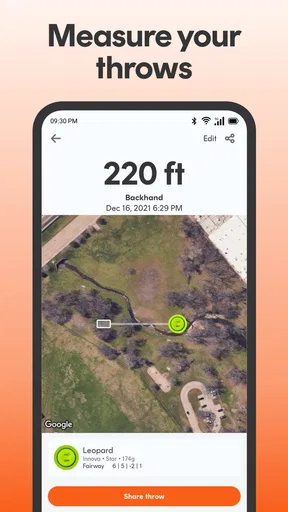
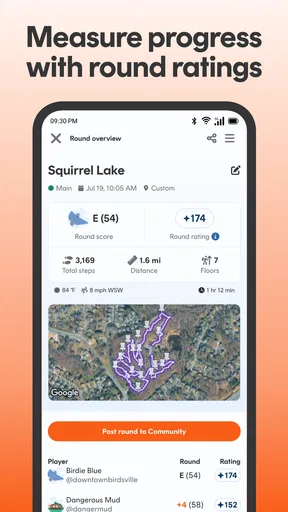
The throw-measuring tool is best treated as an estimate for practice and curiosity, not a formal measurement. GPS-based distance can be affected by how and where you use the phone, so I wouldn’t make equipment or technique decisions based on a single reading. A more useful approach is to compare several throws in similar conditions and look for a pattern. That turns a quick measurement into a modest training aid rather than a promise of precision.
Where it fits—and where it may not
Compared with carrying a paper scorecard, the app is more convenient for tracking several players and reviewing results later, but paper has the advantage of never needing you to handle a phone during a hole. Compared with a general map app, UDisc is more relevant to course discovery and disc golf layouts, while a standard map may be better for broader travel planning. I’d keep the app focused on the round and use other tools when the task is outside disc golf.
There is also a practical trade-off in using any phone-based companion outdoors: you need to keep the device accessible and usable while you play. If you prefer to leave your phone in a bag, dislike recording each hole, or only want a tally at the end, the scorekeeping workflow may feel like extra attention rather than a benefit. New players who are still learning basic rules may get more from playing with an experienced person than from studying stats during a round.
It is rated for Everyone, has more than a million installs, and includes optional in-app purchases priced at $29.99 per item. The core appeal is easy to understand without buying anything: find courses and keep track of a round. I’d begin with those everyday uses and consider paid extras only if I later found a specific need; the listed item price is worth noticing before making any purchase.
If you’re wondering whether it suits a first visit to a course, I think it can, provided you keep the setup simple: locate the course, check the layout, and use the scorecard without trying to explore every tool at once. If your main question is whether it works for a group, the ability to add friends and record their scores makes it more useful than a personal tally, though your group still needs to agree on how you’ll enter scores. And if you want to know whether it can help you improve, it can give you records and measurements to reflect on, but it cannot replace deliberate practice or explain every cause behind a score.
Exploring the Features
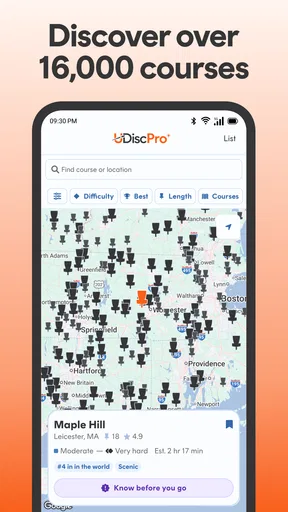
First up, let’s talk about the course directory. UDisc offers an extensive list of courses worldwide. I was pleasantly surprised to find even some of the more obscure courses in my area listed. This is super handy if you love discovering new places to play or if you’re traveling and need to find a course nearby.
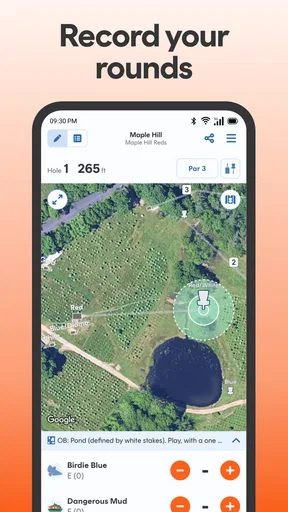
Another feature that stood out to me is the scorekeeping. Gone are the days of juggling a pencil and scorecard. With UDisc, you can easily keep track of your scores right on your phone. The interface is intuitive, which means you can focus more on your game and less on fumbling with paper.
Social and Competitive Elements
UDisc isn’t just about playing solo. You can easily add friends and keep track of their scores as well. This social aspect adds a competitive edge to your rounds. It’s like having a digital leaderboard in your pocket. Plus, you can share your scores and stats with your buddies, which is great for a little friendly banter.
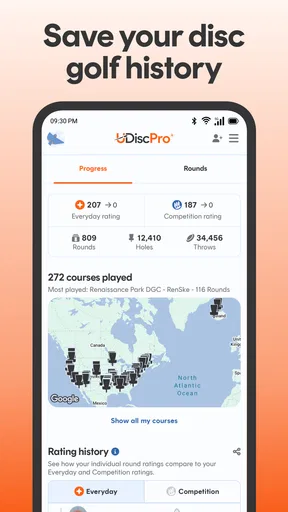
Speaking of stats, UDisc offers detailed statistics that can help you track your progress over time. You can see things like your average score, number of birdies, and even the distance of your throws. It’s like having a coach with you, helping you get better with each game.
Enhancing Your Game
If you’re serious about improving your disc golf skills, you’ll appreciate the measuring tool. This nifty feature allows you to measure the distance of your throws using GPS. You can get instant feedback on how far you’re throwing and adjust your technique accordingly.
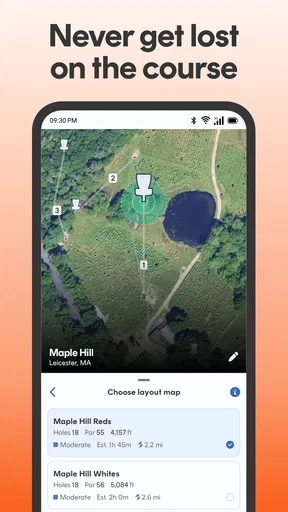
Additionally, the app provides course maps with detailed layouts and hole descriptions. This means no more wandering around looking for the next tee pad. You can plan your strategy before you even step onto the course, which is a huge advantage, especially on more challenging courses.
The User Experience
Now, let’s chat about the user experience. The design is sleek and the app runs smoothly. I didn’t experience any lags or crashes during my time using it, which is always a plus. The navigation is straightforward, making it easy to find whatever you need without any hassle.
One of the things I really appreciate is how the app keeps evolving. The developers are consistently updating it with new features and improvements based on user feedback. It’s clear they have a passion for disc golf and want to make the best app possible for the community.
Final Thoughts
Overall, the UDisc Disc Golf App is a must-have for anyone who loves disc golf. Whether you’re a seasoned pro or just getting started, this app enhances every aspect of the game. From finding new courses to tracking your progress, it’s like having a personal caddy and coach right in your pocket.
So, if you haven’t checked out UDisc yet, I highly recommend downloading it and giving it a spin. Who knows? It might just take your game to the next level. Happy golfing!
Pros
- Real-time GPS tracking for accurate navigation.
- Extensive course database worldwide.
- Scorekeeping with detailed statistics tracking.
- Easy-to-use interface for all skill levels.
- Regular updates with new features.
Cons
- Requires internet for full functionality.
- Some features locked behind a paywall.
- Occasional GPS inaccuracies reported.
- Drains battery quickly during long sessions.
- Limited support for offline mode.
FAQs for UDisc Disc Golf App
What features does the UDisc Disc Golf App offer for players?
UDisc Disc Golf App provides a comprehensive set of features for players, including a digital scorecard, GPS-based course maps, and the ability to track your stats over time. It also offers a course directory, detailed hole information, and community-driven course reviews, making it easier for players to find and select courses.
Is the UDisc App available for both Android and iOS devices?
Yes, the UDisc Disc Golf App is available for download on both Android and iOS platforms. Users can find the app on Google Play Store for Android devices and the Apple App Store for iOS devices, ensuring broad accessibility across different smartphones and tablets.
Does UDisc offer features for both casual and competitive players?
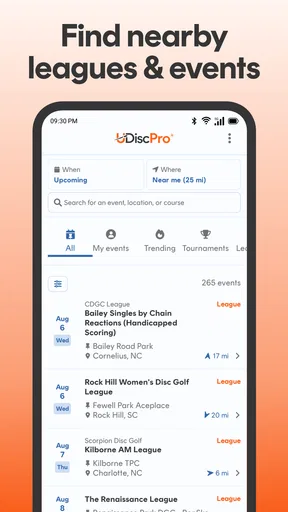
Absolutely, UDisc caters to both casual and competitive disc golfers. Casual players can enjoy easy scorekeeping and course navigation, while competitive players can benefit from advanced stat tracking, leaderboards, and the ability to participate in organized events and tournaments directly through the app.
Is there a cost associated with using the UDisc Disc Golf App?
UDisc offers both free and premium versions. The free version provides essential features like scorekeeping and course maps, while the premium version, available through a subscription, unlocks additional features such as historical stats tracking, offline maps, and enhanced course data, enhancing the overall user experience.
How accurate are the course maps and GPS features in UDisc?
The course maps and GPS features in UDisc are highly accurate, thanks to user contributions and updates from the disc golf community. The app leverages GPS technology to provide precise location tracking and detailed mapping, ensuring players can navigate courses effectively and enjoy a seamless playing experience.


